What is the Auto Start-Stop feature in my Lincoln?
Auto Start-Stop (if equipped)* is a feature designed to help reduce fuel consumption and vehicle emissions by stopping the engine when it is idling (e.g., at traffic lights).
Using Auto Start-Stop
When you apply the brakes and come to a complete stop, your engine automatically shuts off. A light on the instrument cluster will inform you that the engine is off. Your vehicle automatically restarts once you take your foot off the brake pedal.
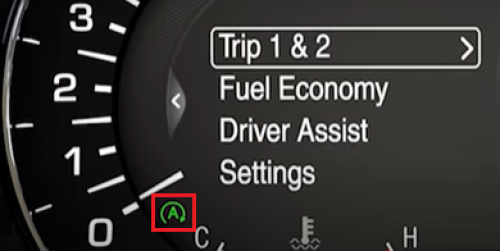
Note: Auto Start-Stop will not shut your engine off if your vehicle's battery is charging, the engine is still warming up, or if you are using heat or air conditioning.
Watch the video below to learn more about this feature.
Disabling Auto Start-Stop
Press the Auto Start-Stop Off button to temporarily disable the feature. Button placement may vary by vehicle model and year. Refer to your Owner's Manual for information specific to your vehicle.
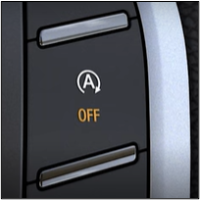
Note: This is not a permanent change; you will have to deactivate it each time you start your vehicle.
If you are unable to disable Auto Start-Stop or have additional concerns, contact your Lincoln Retailer to schedule a service appointment. If a Retailer is not available in your area, contact a Ford Dealer.
Additional Information
How do I remote start using the Lincoln app or the key fob?
Why does my vehicle enter Deep Sleep mode?
*Feature is available on select vehicles. Features may vary based on model year, trim, options, packages, and supply availability. Use the Build and Price tool to view feature availability on current models. If you have questions or need more information, reference your Owner’s Manual or contact your Lincoln Retailer. Driver-assist features are supplemental and do not replace the driver’s attention, judgment, and need to control the vehicle. Refer to your Owner’s Manual for details and limitations.