How do I access my climate control options in my Lincoln?
Your climate controls are accessible using SYNC®*, Lincoln Digital Experience®** or your vehicle's center console physical buttons, depending on how your vehicle is equipped. Refer to the instructions below to open your climate control screen.
Opening Your Climate Control Options
Select your SYNC generation or Lincoln Digital Experience from the drop-down options below to learn how to use your climate control menu in your vehicle. If you need assistance identifying your SYNC generation, select the first drop-down option.
Note: Several climate control options (e.g., air conditioning, heated/cool seats, rear temperature control, etc.) are available. Actual screens and instructions may vary. For information specific to your vehicle, refer to your vehicle's Owner's Manual.
Identifying Your Lincoln's SYNC Generation
Select a resource in the table below to help you identify your vehicle's SYNC generation.
| Resources | Instructions |
| The SYNC and Navigation Updates page | Either:
Your SYNC generation will appear on the right side of the page. |
| The SYNC Visual Reference Guide | Select the link to view example images of SYNC generations that Lincoln has offered. |
Lincoln Digital Experience
To access climate controls in Digital Experience:
Select the person sitting icon in the middle of your vehicle's Digital Experience screen.

Tap the power button icon.

SYNC 4
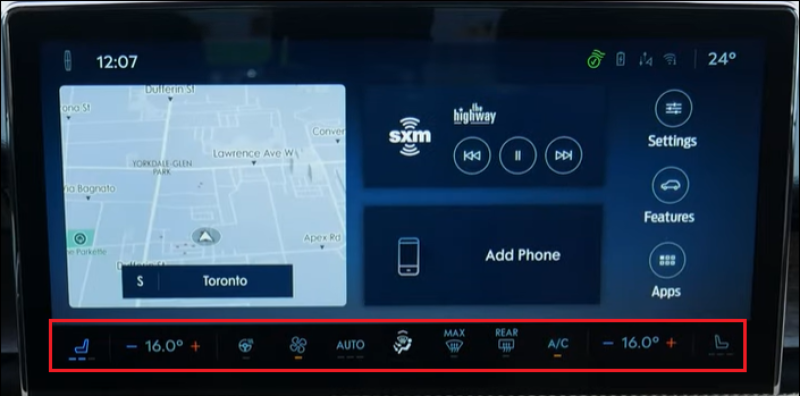
Select the climate controls along the bottom of the Home screen to change the cabin temperature in your SYNC 4-equipped vehicle.
SYNC 3
To access climate controls with SYNC 3, tap the Climate icon on your vehicle's SYNC screen.

SYNC with MyLincoln Touch
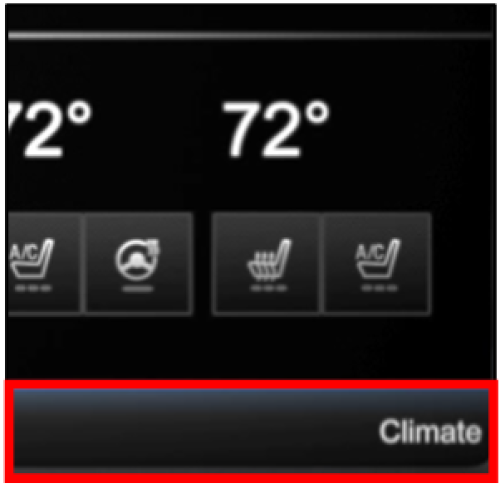
To access climate controls using SYNC with MyLincoln Touch™, tap the Climate bar at the bottom of your vehicle's SYNC screen.
You can also watch the video below for more information.
*Don't drive while distracted or while using handheld devices. Use voice-operated systems when possible. Some features may be locked out while the vehicle is in gear. Not all features are compatible with all phones.
**Some Lincoln Digital Experience features require a Connectivity plan. Don’t drive while distracted or while using handheld devices. Use voice-operated systems when possible. Some features may be locked out while the vehicle is in gear. Not all features are compatible with all phones.